
TpT → Kajabi Importer · Setup
Move your TPT products to Kajabi in one session.
Before Claude can move your TpT store into Kajabi, it needs a few keys to the building. Here's every account and every click, in order. Most people are done in a few hours at most, and you only have to do this once!
Your setup checklist
0 of 6 done- 1. Get Claude Pro5 min
- 2. Add the importer skill2 min
- 3. Connect Kajabi to Claude3 min
- 4. Install the Claude Chrome extension3 min
- 5. Make a free Apify account2 min
- 6. Gather your stuff5 min
You're ready. Go say hi to Claude.
What you'll need
Four tools. You might already have two.
Claude Pro
Your assistant for the whole import. Skills, the Kajabi connection, and the Chrome extension all need a paid plan.
$20/month (US)
Kajabi
Your new home base: your products, checkout pages, and email list, all in one place.
3 months free
Claude Chrome extension
Works inside your browser: copies your full descriptions, saves your covers and files, and puts them into Kajabi for you.
Included with Pro
Apify
Turns your whole TpT store into one spreadsheet in minutes. Best for bigger stores.
Free account
The setup, step by step
Six steps, in order. Tick them off as you go.
01
About 5 min
Get Claude Pro
Claude is the one doing the heavy lifting. Skills, the Kajabi connection, and the Claude Chrome extension all need a paid plan, and Pro is the simplest one.
- Go to claude.ai and sign up, or log in if you already have an account.
- Go to claude.ai/upgrade and choose Pro.
- Optional but handy: grab the Claude desktop app. If you already have your product files saved, it lets Claude name them right on your computer.
Heads up: Claude Pro has usage limits. A big import is a lot of work for Claude, so you might hit your limit partway through. Nothing is lost. Your limit resets every five hours, and you just come back and say "let's keep going." Bigger stores may want to spread the import over a few sittings.
02
About 2 min
Add the importer skill
The skill is the step-by-step brain of the import. Once it's in, you just ask Claude to move your products, and it knows exactly what to do.
- Download the skill file with the button below. It opens in Google Drive: click Download, and keep the file zipped.
- In Claude, open Settings, then Capabilities, and make sure Code execution and file creation is turned on.
- Still in Settings, under Customize, click Skills. Then click + Add in the top right.
- Choose to upload a skill, and pick the zip file.
- Make sure the skill is switched on. You'll see it under Created by you.
03
About 3 min
Log in to Kajabi and connect it to Claude
This is how Claude builds your draft products, offers, and checkout pages for you. Everything it makes stays a draft until you publish it.
- Log in to Kajabi in your browser first, on the account you want your products in.
- In Claude, open Settings. Under Customize, click Connectors, then click + Add in the top right and choose Add custom connector (see below).
- Name it Kajabi and paste this address:
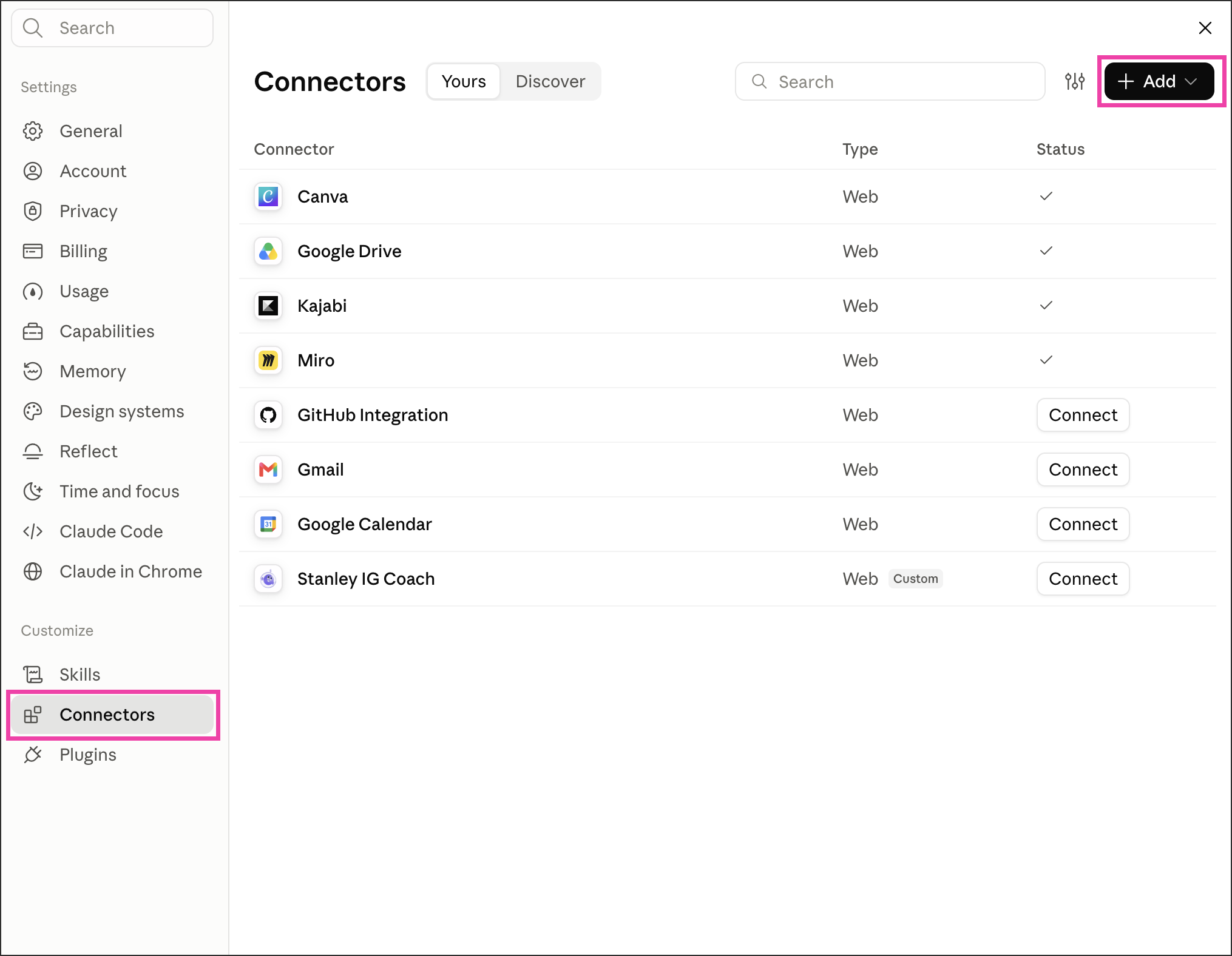
https://mcp.kajabi.com/mcp- Click Add, then approve the Kajabi screen that pops up.
- Test it: start a new chat, turn on Kajabi from the tools menu, and ask Claude to list my Kajabi sites.
No Kajabi account yet? Start with three months free, then come back to this step.
04
About 3 min
Install the Claude Chrome extension
The Claude Chrome extension works inside your own browser. It copies your full TpT descriptions word for word and saves your covers and files. Later, it uploads them to Kajabi and adds your PDFs to each download while you do something else.
- Open Google Chrome on your computer. It doesn't work on phones or other browsers.
- Find Claude in the Chrome Web Store (look for the orange icon, by claude.com) and click Add to Chrome.
- Sign in with your Claude account.
- Pin it: click the puzzle-piece icon in Chrome's toolbar, then the pin next to Claude. The orange Claude icon now stays in your toolbar (see below).
- Click the Claude icon to open the side panel. That's where you'll paste the prompts Claude gives you.

05
About 2 min
Make a free Apify account Bigger stores
Apify reads your whole TpT store and hands you one spreadsheet of every product, in minutes. It's the fastest route for stores with about 40 products or more.
- Go to apify.com and sign up for a free account.
- That's it for now. When you start your import, Claude walks you through running it and downloading your spreadsheet.
Small store? You can skip this one. The Claude Chrome extension can read your store instead. Apify's free plan includes monthly credit, which usually covers a whole store. Use it on your own store only.
06
About 5 min
Gather your stuff
The last bit of prep. No need to organize or rename anything. Claude handles that part.
- Copy your TpT store link from your store page.
- Already have your covers, preview images, and product files saved? Copy them into one folder on your desktop called kajabi-upload. Messy file names are fine.
- Optional: your brand colors and fonts, so your checkout pages look like you.
- Optional: your voice file, if you have one, so any new text sounds like you.
Images and files only on TpT? Skip the folder for now. While the Claude Chrome extension collects your product info, it also saves your covers, previews, and product files, already named and ready for Kajabi. Just stay logged in to TpT in Chrome.

No Kajabi yet?
Give your store a home of its own.
TpT is a marketplace. Kajabi is your own place to sell, with your name on the door and your buyers on your list.
- Your own storefront
A website and landing pages that look like you, not a marketplace grid. - Sell more than downloads
Digital downloads, courses, memberships, coaching, and communities, all in one place. - Checkout built in
One-time payments, subscriptions, upsells, and order bumps. - Buyers become your list
Email marketing and automations sit right next to your products. - Works with Claude
Kajabi connects to Claude, so you can build products, pages, and emails just by chatting.
This is my partner link. If you sign up, I may earn a commission at no extra cost to you. I only share it because I use Kajabi myself.
All set?
Open Claude and say hi.
Claude takes it from here, one step at a time. It checks with you before anything big, and nothing goes live until you publish it.
- Start a new chat in Claude.
- Turn on Kajabi from the tools menu.
- Paste this, and press Enter:
Free printable
Your import workbook
A 9-page guide to every stage of the import: what's coming, your choices, and what you'll do. Keep it next to you while Claude walks you through it, and jot down questions or where you left off.
- The big idea: the whole import in three parts
- All six stages, with your options at each one
- Quick answers for when you get stuck
After your import
How did it go?
I'd love to hear how your import went. Send me a quick review I can share, or tell me what tripped you up. Both help me make this better for the next teacher.
Email me at [email protected]
Sending a review? Tell me if it's okay to share it on my site, and how you'd like your name to show.
Coming soon
Two new ways to sell more, made simple.
Moving your products is step one. Here's what's next.
Claude skill
Kajabi Landing Page & Storefront Builder
Writes and builds your sales pages, storefront, and opt-in pages in Kajabi, in your own voice. No design or copywriting skills needed.
Live workshop
The Simple Sales System
A live workshop where we set up a simple way to keep your products selling, step by step.
Join the waiting list
Get early access and discount codes
Add your name and email to join the waiting list. You'll get early access to the Kajabi Landing Page & Storefront Builder and the Simple Sales System workshop, plus discount codes before anyone else.
Good questions
Before you start
Do I need to be techy?
Nope. If you can copy, paste, and drag a folder, you're set. Claude explains every click as you go.
What does this cost?
Claude Pro is a paid plan ($20 a month in the US), and Claude in Chrome comes with it. Apify's free plan usually covers a whole store. Kajabi is free for three months with my link.
What if I hit my Claude usage limit?
It happens, especially with bigger stores. Claude Pro's usage limit resets every five hours, and your work is saved: your drafts stay in Kajabi, and your product list keeps track of where you are. When your limit resets, come back to the same chat and say "let's keep going." If you start a new chat, attach your product-import-list.csv and Claude picks up where you left off.
Will anything go live without me?
No. Claude creates everything as drafts. Nothing is for sale until you click publish in Kajabi yourself.
Will this change my TpT store?
No. Nothing here changes your TpT store. It stays exactly as it is.
I sell on Etsy or Gumroad. Does it still work?
Yes. Export a spreadsheet of your products from your shop, share it with Claude, and the rest works the same way.
What if I get stuck?
Send Claude a screenshot of what you're seeing, and it'll walk you through it. You can also email me at [email protected].
Claude, Kajabi, Apify, and Teachers Pay Teachers are their own companies' products. This guide isn't made or endorsed by any of them.